












Meet the Latest Quality Standards

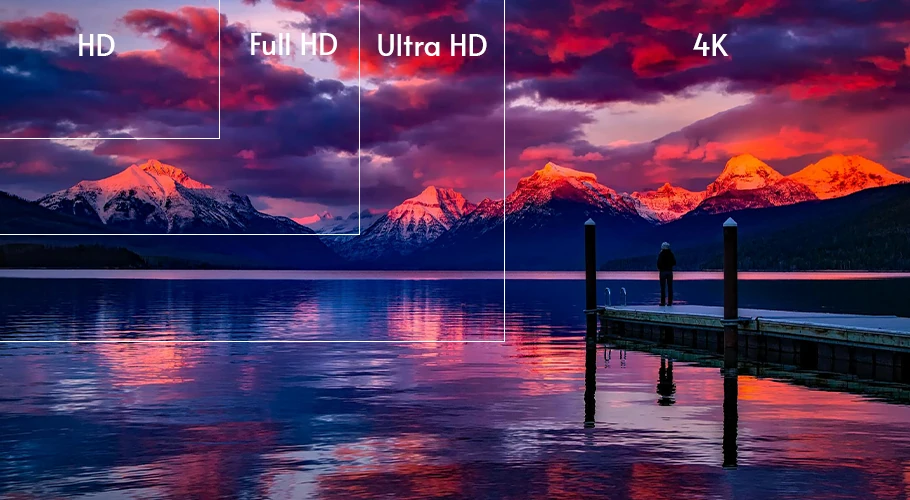
Convert any SD footage to HD or even 4K. Prepare your images and videos for the newest displays and TVs.

No credit card required
|
Trustpilot logo
Rated 4.5/5

Trusted by more than 3 million users

  • Meta logo
  • Revolut logo
  • BBC logo
  • Adobe logo
  • Sky logo
  • Lush logo
  • Kapwing logo
  • BBDO logo
  • Associated Press logo
  • CNN logo
  • Cambridge University logo
  • L'Oreal logo
  • CERN logo
  • Autoreel logo

Upgrade Your Archive

Videos and image from your archive have been captured using a multitude of different cameras from various points in time. And not all have the best quality.

Now is the time to migrate from older standards to newer ones. Say goodbye to Standard Definition and hello to Full HD, 4K and 60FPS.

Feature image

Reuse Old Content

A lot of time went into the production of your footage and now it just sits forgotten because it’s not up to modern quality standards.

It’s time for a change. Enhance old video and image content with TensorPix and start using the old content again. We guarantee it will be much cheaper than producing new content and your viewers will love the old-new look.

Increase Engagement

Did you know higher quality content can increase engagement up to 42%? Upgrading videos to latest 4K 60FPS standard is a must for today’s content if you want to keep engagement high.

High detail images and videos make your brand look more professional and more appealing to buyers. With TensorPix, you’re only a few clicks away from increased engagement.

improve video quality standard?

How to icon

1 - Upload your videos

Select any video on your computer or phone and upload it to TensorPix.
How to icon

2 - Select AI filters

After uploading, select one or more of the AI filters. Each filter can fix specific quality problem.
How to icon

3 - Enhance!

Click enhance, wait for the video enhancing to finish and download your videos.
No credit card required
|
Trustpilot logo
Rated 4.5/5

Frequently Asked Questions

  • Which quality standards does TensorPix support?
    You can enhance video to any of the following video resolution standards: 720p, 1080p, 2K, 4K. Regarding framerate, you can increase framerate up to 8x. That means you can go up to 240 FPS if your input video is 30 FPS. For images, you can upsize images up to 256 megapixels in paid plans.
  • Can I process multiple files at once?
    Yes, we support parallel video and image processing. You can process up to 20 videos at once if you're subscribed to the Elite plan.
  • How does the conversion work?
    TensorPix uses AI (Artificial Intelligence) under hood to upscale and enhance video and image quality. By utilizing AI, we can create more details from the low-quality footage than other non-AI products. The end results is a high-quality video or image very similar to the footage captured with professional camera.
  • Which input video formats are supported?
    You can export enhanced videos to either H264 or H265 codecs. We also support mp4, mkv, and mov containers. More export formats like ProRes are available in the Enterprise plan.
  • Is my data safe and who can see my data?
    We have implemented very high technical and organizational security policies to protect your data. This includes, but it's not limited to: Using military grade 256-bit AES encryption algorithm for all data stored on our servers Using long and random passwords for all access points Using 2 Factor Authentication where applicable Hashing all user account passwords Regularly updating all our systems in order to avoid software exploits and hacks Always giving users an option to delete ALL their data Automatically deleting any unnecessary data such as temporary files Restricting user data access to minimum number of authorized personel Educating all employees about best security and privacy practices Your data is never intentionally shared with other entities inside, or outside of our organization.

Check out more use cases

  • Enhance Video Chat Recordings

    Forget noisy, blurry and low resolution video calls. Create high quality webcam recordings with any laptop camera.

  • Meet Latest Quality Standards

    Convert any SD footage to HD or even 4K. Prepare your images and videos for the newest displays and TVs.

  • Upscale & Enhance Old Videos and Images

    Restore details and remove artifacts, blur and noise. Make your old videos and images look like new.

  • Interpolate low FPS videos with AI

    Goodbye choppy, low-quality video playback. Transform low FPS videos into 60 FPS, silky smooth footage

  • Unblur Videos Online

    Turn blurry footage into stunning clarity with our AI technology. Enhance every detail of your video, from action shots to personal memories, effortlessly and affordably.

  • Stabilize Shaky Videos

    Convert shaky footage into smooth, professional-quality video. Eliminate camera wobble and achieve consistently clear results.

  • Denoise Videos

    Remove various forms of noise from videos. Perfect for noisy night shots or low-light videos.

  • Upscale and Enhance AI Generated videos

    Enhance AI Video quality in less than 3 minutes. Upscale up to 4K and make your videos stand out among others.

Read the latest blog posts

Check out user testimonials

  • Read this review on Trustpilot
    I have used the color restore and AI stabilization on a few dance videos for social media and I am really happy with the results, I uploaded 4K video so it takes a bit of time, but I like that they send me an email and enhance in the background so that I don't have to wait around.
    Tanya Ariana Bendis
    Marketing Director
  • It’s a great tool for increasing resolution and upscaling, especially for those without the necessary hardware. Since AI training and model usage can be prohibitively expensive for most, packaged online tools like TensorPix Enterprise offer a cost-effective and accessible solution. It’s a great option for anyone looking for a simple and straightforward way to use AI video enhancers without prior experience!
    Zeng Chao
    FX Artist
  • Read this review on Trustpilot
    Fantastic AI video upscaler with easy to use UI! Significantly better results than with Topaz and am able to process multiple videos at once, resulting in major time savings. A life saver.
    Anne Spalter
    Owner of Anne Spalter Studios
  • As AI evolves and improves, TensorPix will likely expand, offering even more sophisticated insights and analyses to filmmakers and studios like ours. For now, the power of TensorPix AI serves as a testament to the innovative ways technology can be utilized to strengthen the human experience and our connection to the stories we love. It allows us to enhance old looking films and show them to our audience in high quality with nearly to no artifacts. TensorPix is by far the best web-based video and photo enhancement service and is going to change the filmmaking world. Do yourself a favor and use it!
    Matan Uziel
    Executive Producer

Explore more Products from TensorPix

  • AI Video Quality Enhancer

    Upscale videos up to 4K and enhance video quality. 100% online and easy to use.

    Enhance Videos
  • Real Estate Video Maker

    Turn listing photos into polished real estate videos in 10 minutes. Get cinematic videos without touching a video editor.

    Create Listing Video
  • TensorShots

    Auto Social Media Video Creator. Turn photos, clips, listings, and brand assets into ready-to-edit short videos for social media.

    Create Videos
  • Online Video Compressor

    Reduce video file size without compromising quality. Save disk space, send, and upload videos faster.

    Compress Videos
  • AI Image Generator

    Generate photos, artwork, illustrations from text descriptions in 4K. Edit images with simple prompts.

    Generate Now
  • 4K AI Video Generator

    Turn your ideas into 4K videos from text and image inputs using simple prompts. No technical expertise needed.

    Generate Videos
  • Upscale & Enhance API

    Add video enhancing and upscaling into your app or product via API Integration.

    Tell me More

Ready to make better video content?

Join millions of creators already using TensorPix