8 use cases where AI voiceover works best in real estate marketing
Explore practical use cases of AI voiceover in real estate, from listing tours and open houses to luxury, neighborhood, and property update videos.
9 minute read
A professional AI voiceover can turn verified listing details into a clear narration without requiring an agent to write, record, and edit every line manually. That doesn’t mean every real estate video needs narration. AI voiceover is most useful when the viewer needs context that the photos can’t provide alone.
Here are the real estate marketing use cases where it adds the most value.
When to use AI voiceover and when to skip it
AI voiceover adds the most value when a video needs explanation, structure, or repeatable narration. When the visuals already communicate the message, music, captions, or an agent speaking naturally may be the better choice.
| Video type | Use AI voiceover? | Why | Best voice style | Skip it when |
|---|---|---|---|---|
| GUIDED LISTING TOUR | Yes | Narration can connect rooms, establish the viewing order, and highlight features that photos don’t explain alone. | Clear, calm, and conversational | The video is extremely short or the narration only repeats visible captions |
| OPEN-HOUSE PROMOTION | Yes | Voiceover can communicate the date, time, location, and strongest reason to attend. | Clear and energetic without sounding rushed | Event details are still changing or can’t be verified before publishing |
| LUXURY PROPERTY VIDEO | Yes | Controlled narration can connect architecture, materials, setting, and lifestyle without reading a feature list. | Calm, restrained, and confident | Music and cinematic visuals create a stronger presentation on their own |
| COMPLEX LAYOUT | Yes | Narration can explain split levels, connected rooms, guest suites, and access to outdoor areas. | Direct, measured, and informative | The photos or floor plan don’t support the spatial relationships being described |
| SHORT SOCIAL TEASER | No | A brief visual hook, music, and a few words on screen are often easier to absorb in a very short video. | No voice, or one concise opening line | The voiceover would compete with the visual hook or force too much information into a few seconds |
| NEIGHBORHOOD VIDEO | Sometimes | Narration can connect the property with verified amenities, transportation, parks, and local attractions. | Warm, informative, and neutral | Location claims are subjective, outdated, difficult to verify, or likely to imply who should live there |
| MARKET UPDATE | Yes | AI voiceovers can present verified statistics and produce consistent versions for different areas or channels. | Credible, conversational, and precise | The agent's personal analysis, presence, or on-camera delivery is central to building trust |
| PERSONAL BRAND VIDEO | Selectively | A consistent AI voice can support educational clips, recurring series, or videos the agent can’t record personally. | Natural and aligned with the agent's established tone | Viewers expect to hear directly from the agent or the message depends on personal experience and emotion |
A simple decision rule is to use AI voiceover when it tells the viewer something useful that the images can’t explain alone. Skip it when narration merely describes what is already visible.
1. Guided listing tours
A guided property tour is the most direct use of AI voiceover in real estate.
Instead of showing listing photos in a silent slideshow, narration leads viewers through the property:
“From the covered entrance, step into an open living space with large windows and direct access to the kitchen and dining area.”
2. New listing announcements
A new listing video usually needs to communicate the most important information quickly.
AI voiceover can introduce the property, location, price range, and strongest selling point in the opening seconds:
“New to the market in North Austin: a four-bedroom home with an updated kitchen, flexible office, and a private backyard built for entertaining.”
The rest of the video can show the features mentioned in that opening.
3. Open-house promotions
Open-house videos have a specific job: give people enough interest and information to attend.
The narration should lead with the date, location, and reason to visit:
“Tour this renovated three-bedroom home Saturday from 1 to 3 p.m. and see its open kitchen, finished lower level, and landscaped backyard in person.”
4. Luxury property videos
Luxury real estate often benefits from slower, more controlled narration.
Instead of reading a list of features, the script can connect architecture, materials, setting, and lifestyle:
“Floor-to-ceiling glass brings the surrounding landscape into the main living area, while the open terrace creates a natural extension for dining and entertaining.”
The voice should feel calm and confident.
5. Properties with complex layouts
Some homes are difficult to understand through separate photos. Split levels, guest suites, converted spaces, connected outdoor areas, and open-plan layouts may need additional explanation.
This is where property video narration becomes especially useful.
The voiceover can explain:
- How the kitchen connects to the dining and living areas
- Whether a bedroom is on the main floor
- Where the home office sits in relation to the entrance
- How the guest suite is separated from the main living space
- Whether the terrace can be reached from multiple rooms
- How an additional structure relates to the main house
Narration should clarify the actual layout, not compensate for missing information.
6. New construction and development marketing
Photos and renders of new construction often need context. Buyers may be looking at an unfinished home, a model unit, or a set of architectural visuals rather than a completed property.
AI narration can explain what each image represents and how the planned spaces will work:
“The main level is designed around an open kitchen and living area, with sliding doors connecting the interior to the covered terrace.”
7. Neighborhood and location videos
AI voiceover can connect the listing to nearby amenities, transportation, parks, schools, shopping areas, or community features.
For example: “Located close to the town center, the home provides convenient access to local restaurants, everyday shopping, and the riverside walking trail.”
Only include location claims you can verify. Avoid broad statements such as “the best neighborhood” or promises about travel times that may vary.
8. Price changes and listing updates
Agents often need to promote the same listing more than once. A price adjustment, completed renovation, new open-house date, or return to market creates a reason for a fresh video.
A price-update video might open with:
“Now offered at $625,000, this four-bedroom home combines a renovated main floor with a large backyard and convenient access to downtown.”
The new information should appear early. Don’t hide the reason for the update near the end of the video.
Choosing the right AI voice
Choose the voice before finalizing the script. The narrator’s tone and speed affect how much text will fit naturally into each scene.
Consider the property and its audience:
- Warm and conversational for family homes
- Calm and restrained for luxury properties
- Clear and energetic for open-house Reels
- Direct and practical for investment properties
- Relaxed and welcoming for rentals or vacation homes
The best professional AI voice isn’t necessarily the most dramatic. It is the one that remains clear, natural, and appropriate for the listing.
When to add music and captions
Voiceover explains the property. Music establishes the mood. Captions make the message available when audio is unavailable or difficult to hear.
Background music should sit below the narration. Tracks with prominent lyrics can compete with the speaker, so instrumental music is often the cleaner choice.
Captions are especially important for social videos. They also improve accessibility by presenting spoken information as synchronized text.
Creating AI voiceover using TensorPix Property Video Maker
TensorPix Property Video Maker brings the voice, script, listing photos, music, and branding into one property-video workflow.
1. Start a property video project
Log in to TensorPix, and open the Property Video Maker. Create a new project, then upload your listing photos or import the available media from a supported property listing like Zillow.
2. Add the strongest listing photos
Place the most important images first: the exterior, main living area, kitchen, primary bedroom, outdoor space, or view. Avoid dark, cluttered, repetitive, or heavily edited photographs.
3. Add verified listing information
Enter the price, location, room layout, amenities, updates, and other details you want the video to mention.
4. Choose a professional AI voice
Go to the Music & Voiceover section and select a voice that suits the property and your brand. Preview its tone, pacing, and pronunciation.
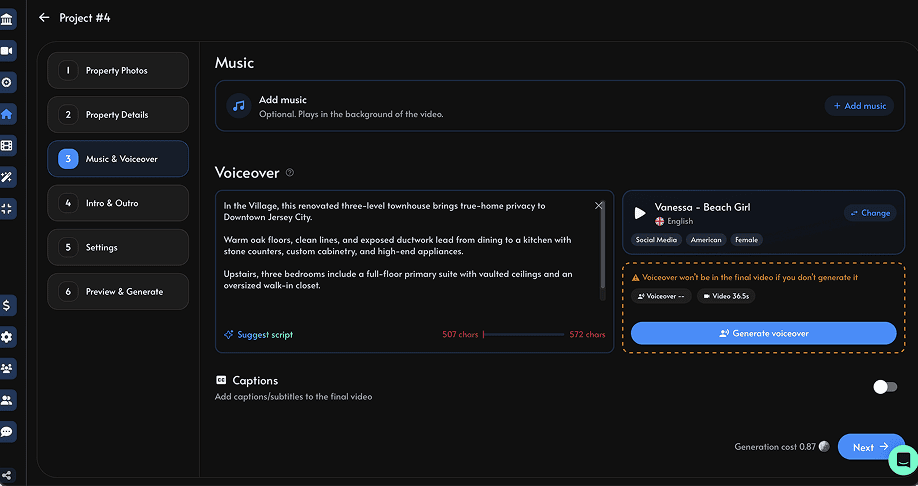
5. Review for accuracy
Before exporting, check every caption, room label, property detail, price, and claim. Make sure the video doesn't imply features the property doesn’t have. AI can create a strong first draft, but the agent still needs to review it like any other listing material.
6. Generate your first video
Create the version that matches the channel. If the listing will be promoted in several places, generate more than one version and download it once satisfied with the final outcome.
Conclusion
AI voiceover works best when real estate videos need explanation, structure, or a consistent brand voice. It can guide buyers through a listing, promote an open house, explain a complex floor plan, introduce a neighborhood, or refresh an existing campaign.